
More Than
QR Ordering.
Most QR systems help guests place an order. ScanPay helps venues increase sales, understand their customers and improve the entire guest experience.
Built for restaurants, cafés, hotels, rooftops and beach clubs.
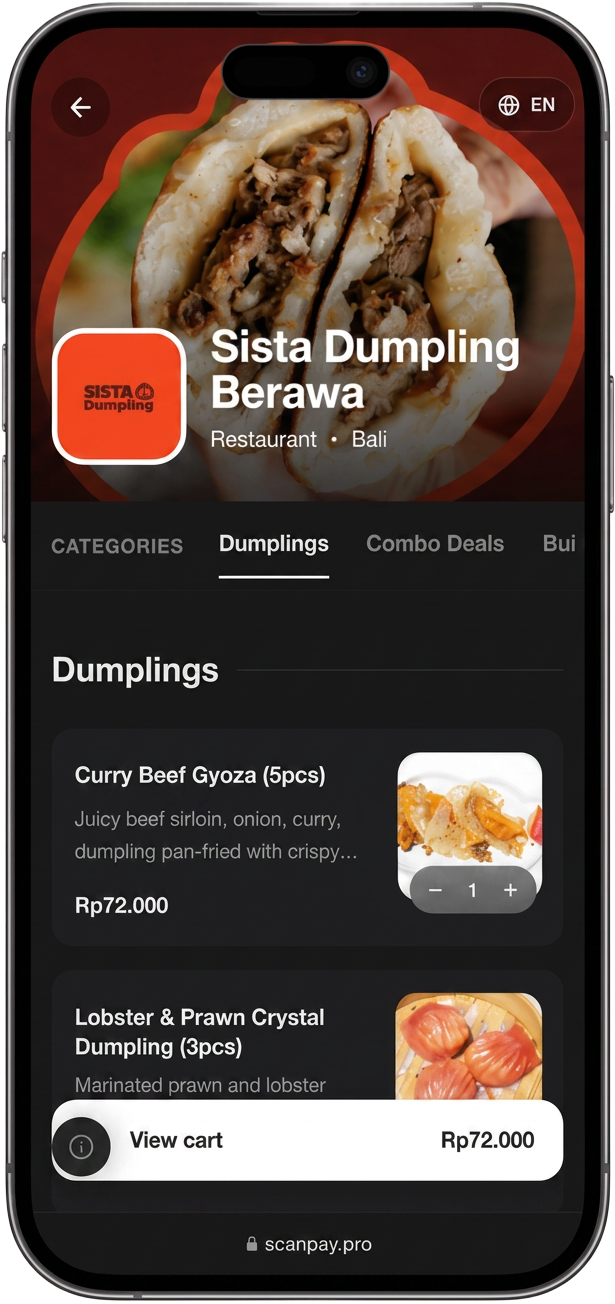
A complete guest experience platform
Traditional QR ordering systems often focus only on displaying a menu and sending orders to the venue. ScanPay is designed as a complete guest experience and revenue platform.
ScanPay vs a basic QR ordering system
A side-by-side look at what each type of system typically covers. Capabilities of other solutions vary by provider.
| Feature | ScanPay | Basic QR ordering system |
|---|---|---|
| Automatic menu translation | Automatic translation into multiple customer languages | Often limited to one or a few manually configured languages |
| Customer data | Name, verified contact details, visit history, spending and favourite products when customers create an account and give the required consent | Often limited customer insights or anonymous order data |
| Scheduled promotions | Promotions can activate automatically by date, day and hour | Often requires manual price or menu updates |
| Upselling tools | Promotional banners, featured products, recommendations and targeted offers | Mostly static menu presentation |
| Menu information | Ingredients, allergens, calories when supplied by the venue, dietary information and product options | Often limited to product name, description and price |
| Venue information | Wi-Fi password, Instagram, contact details, opening hours and location | Often not included directly in the guest journey |
| Customer account | One account across participating ScanPay venues, with favourites and order history | Often guest-only ordering or separate account systems |
| Reviews | Internal guest feedback, customer-recovery workflow and direct access to the venue's Google review page | Often no integrated review-management workflow |
| Upcoming hospitality features | Online reservations, payment links, table payments, loyalty and additional guest-experience tools | Mainly focused on menu display and ordering |
Automatic menu translation
ScanPay
Automatic translation into multiple customer languages
Basic QR ordering
Often limited to one or a few manually configured languages
Customer data
ScanPay
Name, verified contact details, visit history, spending and favourite products when customers create an account and give the required consent
Basic QR ordering
Often limited customer insights or anonymous order data
Scheduled promotions
ScanPay
Promotions can activate automatically by date, day and hour
Basic QR ordering
Often requires manual price or menu updates
Upselling tools
ScanPay
Promotional banners, featured products, recommendations and targeted offers
Basic QR ordering
Mostly static menu presentation
Menu information
ScanPay
Ingredients, allergens, calories when supplied by the venue, dietary information and product options
Basic QR ordering
Often limited to product name, description and price
Venue information
ScanPay
Wi-Fi password, Instagram, contact details, opening hours and location
Basic QR ordering
Often not included directly in the guest journey
Customer account
ScanPay
One account across participating ScanPay venues, with favourites and order history
Basic QR ordering
Often guest-only ordering or separate account systems
Reviews
ScanPay
Internal guest feedback, customer-recovery workflow and direct access to the venue's Google review page
Basic QR ordering
Often no integrated review-management workflow
Upcoming hospitality features
ScanPay
Online reservations, payment links, table payments, loyalty and additional guest-experience tools
Basic QR ordering
Mainly focused on menu display and ordering
Built to Be Simple
ScanPay is designed for both venue teams and customers.
For your team
- Easy onboarding
- Create catalogues, categories and products
- Upload menu images or import menu information
- Update prices and availability
- Mark articles as sold out
- Create scheduled promotions
- Manage everything from one dashboard
For your guests
- No application download required
- Scan the QR code
- Select a language
- Browse the menu
- View complete product information
- Order from the phone
- Access venue information
- Save favourite items when logged in
Simple for your team. Effortless for your guests.
Your Menu Speaks Your Customer's Language
ScanPay can automatically translate menu content into multiple languages, helping international guests understand products without repeatedly asking staff for explanations.
- Better experience for tourists
- Fewer repetitive questions for staff
- Faster decisions
- Fewer misunderstandings
- Easier ordering for international customers
Many basic QR solutions rely on manually entered languages or offer limited multilingual support. With ScanPay, translations are generated automatically and venues can review and edit them at any time.
Every Detail Guests Need
Guests can make informed decisions directly from their phone.
- Product name
- Description
- Ingredients
- Allergens
- Calories when entered by the venue
- Dietary information
- Halal status when confirmed by the venue
- Vegan and vegetarian labels
- Spicy level
- Product options
- Add-ons
- Preparation notes
Product, nutritional, dietary and allergen information is provided and verified by the venue.
Turn Your Digital Menu Into a Sales Tool
ScanPay does not simply display products. Venue managers can build offers that run on their own.
Promotions you can create
- Product discounts
- Category discounts
- Catalogue-wide promotions
- Promo codes
- Happy hours
- Buy X, Get Y offers
- Minimum-order discounts
- Promotional banners
- Featured products
- Chef recommendations
Scheduling
Promotions can automatically appear and disappear according to a configured start date, end date, day of the week and time.
“50% off cocktails every Friday from 5 PM to 7 PM.”
Clicking a promotional banner takes the customer directly to the relevant product, category or catalogue.
- Highlight high-margin products
- Promote slow-moving inventory
- Increase average order value
- Launch offers without manually changing the menu
Understand Who Your Customers Are
When customers create an account and provide the required consent, the venue can access customer information connected to its own establishment.
Data you may access
- First name
- Last name
- Verified WhatsApp number
- Verified email address
- Number of visits
- Number of orders
- Total amount spent
- Average order value
- Favourite products
- Favourite categories
- Order history
- Promotion usage
- Review history
Each venue can only access customer activity related to its own establishment. Customer data must be collected and used according to consent and applicable privacy requirements.
- Identify returning customers
- Understand purchasing behaviour
- Improve loyalty
- Personalise offers
- Build stronger customer relationships
Collect Feedback and Improve the Guest Experience
Customers can leave internal feedback directly through the ScanPay QR menu, and it lands in the venue dashboard.
In your dashboard
- Rating
- Comment
- Order information
- Customer details when available and authorised
- Status
- Team assignment
- Internal notes
For low ratings
- Alert the venue team
- Mark the review as needing attention
- Contact the customer when permitted
- Support a customer-recovery workflow
Google reviews
- Connect the official Google review page
- Give customers access to the Google review link after submitting feedback
- Track whether the Google CTA was clicked
ScanPay helps venues collect private operational feedback, respond quickly to poor experiences and make it easy for guests to access the venue's Google review page. The Google review action remains available under the same conditions for every customer — ScanPay never hides it based on a rating and never blocks or removes negative reviews.
Everything About the Venue in One Place
Guests no longer need to ask staff for information that can be accessed instantly from the menu.
- Wi-Fi name
- Wi-Fi password with copy button
- Phone number
- Website
- Address
- Google Maps
- Opening hours
- Venue description
One Account Across ScanPay Venues
Customers can create one ScanPay account using WhatsApp OTP or email OTP — no separate account for every participating restaurant.
Sign in options
- WhatsApp OTP
- Email OTP
Once logged in
- Favourite products at the current venue
- Current orders
- Previous orders
- Faster ordering
- Saved profile information
Built for What Comes Next
Planned features, presented as coming soon.
Online reservations
Payment links
Pay directly from the table
Xendit and Stripe payments
Digital loyalty
Minimum spend for VIP tables and daybeds
Shared table balances
Customer rewards
Advanced customer analytics
Additional POS integrations
Feature availability may vary by market, venue and subscription.
Designed for International Hospitality
ScanPay is designed for hospitality venues serving both local and international guests, and built to scale across international hospitality markets.
- International customers
- Multiple languages
- Multiple currencies
- Venue-level time zones
Hospitality formats
- Restaurants
- Cafés
- Hotels
- Rooftops
- Beach clubs
- Room service
Why venues choose ScanPay
Easy to Use
Simple onboarding and an intuitive dashboard.
Multilingual
Help international guests understand the menu.
Built for Upselling
Promotions, recommendations and featured products.
Customer Insights
Understand visits, spending and favourite products.
More Than Ordering
Reviews, venue information, customer accounts and analytics.
Continuously Improving
New hospitality features are added over time.
Frequently asked questions
Is ScanPay only a QR ordering system?+
No. ScanPay combines digital menus, ordering, promotions, customer accounts, reviews, customer insights and venue information.
Can ScanPay translate my menu?+
Yes. ScanPay supports automatic translation into multiple customer languages, with the option for venues to review and edit translations.
Can I launch scheduled promotions?+
Yes. Promotions can be scheduled according to dates, days of the week and hours.
Can I access customer data?+
When a customer creates an account and provides the required consent, the venue can access customer information and activity related to its own establishment.
Can guests leave Google reviews?+
Yes. Venues can connect their official Google review page and make it accessible through the ScanPay guest journey.
Does ScanPay block bad reviews?+
No. ScanPay does not block or remove negative Google reviews. It allows venues to collect internal feedback and respond quickly to poor experiences.
Can guests pay from the table?+
Table payments and additional payment features are planned or may be available depending on the market and payment-provider integration.
Ready to Go Beyond Basic QR Ordering?
See how ScanPay can improve your guest experience, increase upselling opportunities and give you a better understanding of your customers.
No POS replacement required to start with the digital menu.